
Amazon Web Services (AWS) makes cloud computing accessible to everyone, from students and startups to large enterprises. Its flexibility and ease of use allow beginners to deploy applications within minutes. However, this convenience can also be misleading. New users often focus on getting services up and running quickly, without fully understanding the architectural, security, and cost implications behind each decision. As a result, small configuration mistakes can quickly escalate into security vulnerabilities, unexpected bills, performance issues, or even service outages.
Understanding common AWS mistakes early in the learning journey is crucial. These pitfalls are not caused by a lack of intelligence, but by unfamiliarity with cloud best practices and shared responsibility. By identifying these mistakes and learning how to avoid them, beginners can build AWS environments that are secure, scalable, highly available, and cost-effective from day one. This article highlights the most common AWS mistakes beginners make and provides practical guidance on how to avoid them.
1. Leaving Security Groups Open to the Public
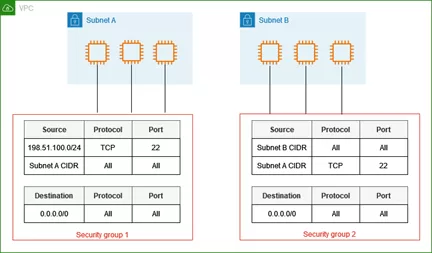
Leaving security groups available to the public is one of the most frequent blunders made by novices. Using rules like 0.0.0.0/0 for SSH, RDP, or database ports to provide unlimited inbound access exposes resources directly to the internet and leaves them open to attack. This frequently occurs during testing and is then forgotten. Sensitive services, such databases, should be located in private subnets with no public access in order to prevent this. Access should always be limited to certain IP addresses or private networks.
2. Hardcoding AWS Credentials in Code
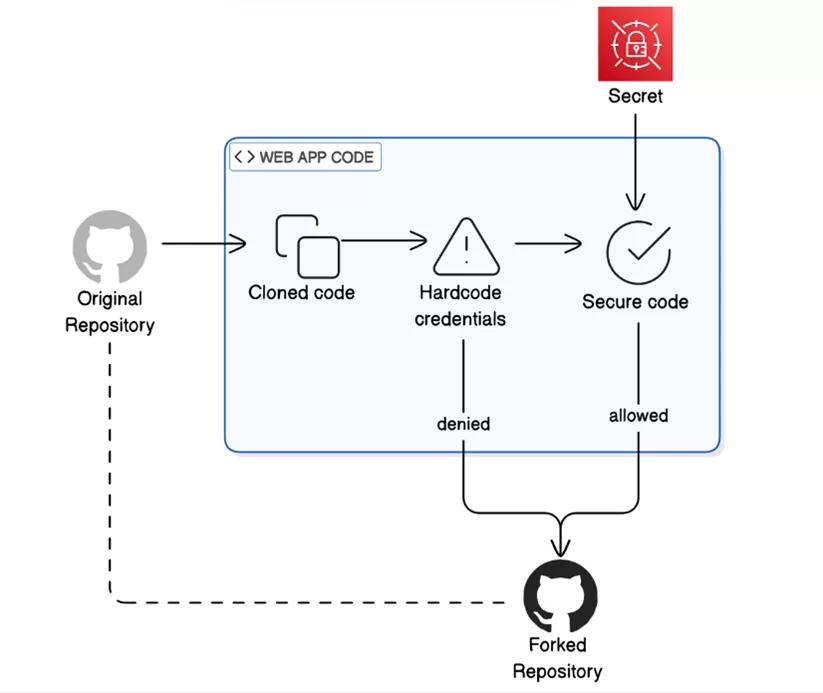
Hardcoding AWS credentials into application code or configuration files is a critical security mistake often made for convenience. Beginners may store access keys in environment files, scripts, or even public Git repositories, unknowingly exposing their AWS accounts to serious risk. If these credentials are leaked or compromised, attackers can gain full access to cloud resources, leading to data breaches or unexpected charges.
The recommended approach is to use IAM roles and policies, which allow AWS services such as EC2 and Lambda to securely access other services without embedding credentials in code. Using temporary credentials through roles, along with regular key rotation, significantly reduces the risk of unauthorized access and improves overall security posture.
3. No Cost Monitoring or Billing Alerts
A lack of cost visibility is another common issue among AWS beginners. Since AWS operates on a pay-as-you-go pricing model, unused or over-provisioned resources can quickly increase monthly expenses. Without proper monitoring, users often discover unexpected charges only after receiving their bill.
Implementing AWS Budgets and CloudWatch billing alarms helps track spending in real time and sends alerts when costs exceed predefined thresholds. Regular reviews using AWS Cost Explorer further assist in identifying inefficient resource usage and opportunities for cost optimization, ensuring better financial control over cloud environments.
4. No Backup or Disaster Recovery Strategy
Failing to implement proper backup and disaster recovery procedures is a serious mistake for beginners. Many assume that AWS automatically backs up all resources, which is not the case. While services like Amazon RDS support automated backups, they must be explicitly configured and tested. Similarly, EBS snapshots are necessary to safeguard data stored on EC2 instances. Without a proper backup strategy, accidental deletions, data corruption, or infrastructure failures can lead to irreversible data loss and extended downtime.
5. Over-Permissive IAM Policies
Granting overly broad IAM permissions is another common error. For convenience, beginners often assign users or roles high-level policies such as Administrator Access. If credentials are compromised, this dramatically increases the potential impact of a security breach.
The best practice is to follow the principle of least privilege, granting only the permissions required for a specific task. Additionally, using IAM roles instead of users for applications improves both security and auditability, reducing the risk of unauthorized access and limiting the blast radius in case of credential compromise.
6. Ignoring Fault Tolerance and High Availability
Failing to design for fault tolerance and high availability is a frequent oversight. Beginners often deploy applications on a single EC2 instance or within a single Availability Zone, assuming failures are rare. However, outages can occur due to hardware failures, maintenance events, or capacity limitations.
Designing applications across multiple Availability Zones using Elastic Load Balancers and Auto Scaling Groups ensures higher availability and resilience. This approach minimizes downtime and ensures that applications remain accessible even in the event of infrastructure failures.
7. Not Cleaning Up Unused AWS Resources
Neglecting to remove unused resources is a common mistake among AWS beginners. Stopped EC2 instances, unattached EBS volumes, old snapshots, and unused Elastic IPs continue to incur costs even when they are no longer in use. Over time, these forgotten resources can significantly increase monthly AWS expenses. Implementing regular audits and using resource tagging strategies helps identify and delete unnecessary components.
8. Lack of Monitoring and Logging
Failing to enable proper monitoring and logging is another frequent oversight. Without logs and metrics, troubleshooting performance issues or investigating security incidents becomes extremely difficult. Beginners often deploy applications without configuring CloudWatch logs or setting up alarms.
Enabling logging and monitoring for EC2 instances, load balancers, and applications provides better visibility into system health. It also allows teams to detect problems quickly, respond proactively, and maintain a secure and reliable AWS environment.
Conclusion
These errors are frequent but careful design and governance are necessary for long-term success. Beginners may steer clear of these traps and create scalable, production-ready AWS setups by concentrating on security, cost awareness, availability, and monitoring from the outset.